Website chat
AI Website Receptionist With Booking: Turn Site Visitors Into Booked Jobs
By Vistic AI editorial teamUpdated 9 min read
The short answer
An AI website receptionist with booking is a chat on your site that knows your services, areas and hours. A visitor asks a question, it answers, asks a few questions to qualify the enquiry, offers a time from your diary and books it. Visitors can type or talk. Anything it cannot answer goes to you as a message with the details. It works the same way as your phone receptionist, so phone and website bookings land in one diary. Test it with five visitors before you rely on it.
What is an AI website receptionist with booking?
An AI website receptionist with booking is a chat box that answers visitors and books them in. It differs from a contact form because it replies straight away, and from a basic chatbot because it can book a job into your diary, not only collect a name. In our product it is called voice chat, and voice chat for small business websites lets visitors type or tap to talk. It also works as lead capture chat for small business: every chat that does not book still leaves you a message with the details.
How is it different from a contact form?
A contact form collects a message and waits for you. A visitor with a leaking tap fills it in at 9 pm and hears nothing until you reply the next day, by which time they may have rung someone else. A website receptionist answers at once, asks your questions and offers a time. The visitor leaves with a booking, and you get the details as a job card.
How is it different from a booking app?
A booking app lets customers pick a time from your calendar and nothing else. It cannot answer "do you service Penrith?" or "can you do a fence quote?". Many customers would rather not download anything, and many ring or chat first. A website receptionist books like an app and answers like a person, with no download. See our note on booking apps for tradies.
What does a visitor see on your website?
They see a chat that sounds like your business. The example below is from our own product page. It is a sample, not a recording of a real customer.
Three things happen in those six lines. It confirms the service area, it understands the job, and it books from the diary. The visitor did not fill in a form, wait or ring.
Can visitors talk instead of type?
Yes. Voice chat takes text or voice, so a visitor on a phone can tap and speak. It is useful for tradies' customers, who are often on their phones, standing in the room with the problem.
How does an AI website receptionist qualify an enquiry?
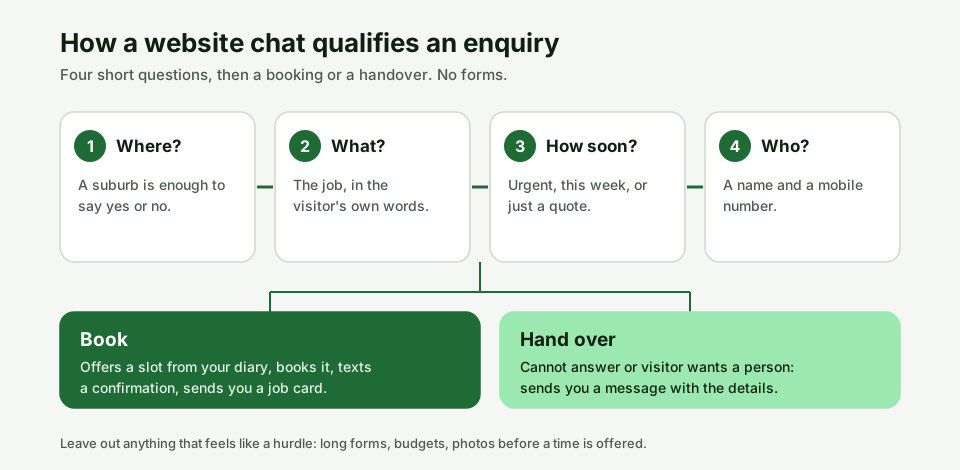
It qualifies by asking the few questions that decide whether and when you can do the job. Qualifying is not interrogating. It is the same short list you would ask on the phone, in your order, so the job card has what you need.
Which questions should a website receptionist ask?
Ask only what you need to book and to turn up prepared:
- Where is the job? A suburb is enough to say yes or no to the area.
- What do they need done? In the visitor's own words.
- How soon? Urgent, this week or just a quote.
- Who is it, and how do we reach them? A name and a mobile.
Which questions should it not ask?
Leave out anything that feels like a hurdle before a booking: a long form, a budget, a request for photos before it has offered a time, or an account sign-up. Every extra field is a reason to leave. Add a question only if the answer changes what you do. You can tighten the list after a week of real chats.
How does it book a job from the website?
It books the same way the phone receptionist does. It checks the days and hours you have opened, offers a slot inside your rules, books it, texts a confirmation and sends you a job card. Because phone and chat use one diary, a caller and a visitor cannot take the same slot. Our guide to AI receptionist appointment booking covers the rules in detail, and the after hours guide covers the overnight case.
What happens when a visitor asks something it cannot answer?
It says so, takes the details and sends them to you as a message. It should not guess a price or promise an arrival time. You stay in charge, and see the human handover guide for the full rules and a test list.
How do you add an AI receptionist to your website?
You add it in three steps.
- Tell it your business. Your services, areas, hours and what you do not do. We build it from that.
- Add one line to your site. On a Front Desk plan we build the site for you with the chat in place. On an existing site you paste one line.
- Customers start booking. Each chat ends as a job card on your phone.
Do you need a new website to use it?
No, if you already have a site you can add the chat with one line. If you have no site, or an old one, a Front Desk plan builds a fast site for your trade with the chat in place. The AI front desk page shows what comes with it.
Should the chat tell visitors it is an AI?
Yes, as a matter of honesty and good practice. The OAIC says public-facing AI tools such as chatbots should be clearly identified as such to customers. That is guidance, not statute, and most small businesses with turnover of $3 million or less are not covered by the Privacy Act. A line such as "I'm the AI receptionist for Sam's Plumbing" in the first message does the job. This is general information, not legal advice.
How do you test a website receptionist before you trust it?
Open your own site in a private window and run five chats.
- A routine job in your area. Does it book a sensible slot and show up as a job card?
- A suburb you do not service. Does it say so politely?
- A question about price. Does it avoid promising a figure you did not set?
- A question you did not teach it. Does it admit it does not know and take the details?
- A request to speak to a person. Does it send you a message and say when you will reply?
Then try it on your phone, with voice, because that is where most visitors will be.
What does an AI website receptionist cost?
Voice chat comes with the Front Desk plans that include a website. Front Desk Crew is $399 a month and Front Desk Business is $699 a month, each plus a one-off $990 site setup, ex GST and month to month. If you already have a site and want only the chat, ask us and we will quote it. Prices are placeholders until final pricing is set, and the pricing page is the current source.
Quick answers to common questions
Can an AI chatbot book appointments for a tradie?
Yes. Vistic AI voice chat books a time from your diary and sends you a job card. Other tools differ, so check that a chat books and does not just collect a name.
Can customers talk to it, not only type?
Yes. Visitors can type or tap to talk.
Does it work on my existing website?
Yes. You paste one line on an existing site, or a Front Desk plan builds the site with the chat in place.
Does it use the same diary as the phone receptionist?
Yes. Phone and chat book into one diary, so the same slot is not offered twice.
What if the chat cannot answer?
It takes the details and sends you a message.
Does it tell visitors it is an AI?
It should. The OAIC says public-facing AI tools should be clearly identified. Put it in the first line.
Do I need a booking app as well?
Not if the chat books. It does the same job and answers questions as well.
Sources
- OAIC, Guidance on privacy and the use of commercially available AI products, published 21 October 2024, updated 17 January 2025.
- OAIC, Small business.
- Vistic AI, voice chat and pricing pages, first-party.
Updated 22 November 2026. Corrections log: none yet. Vistic AI sells an AI receptionist and website chat, so we have a commercial interest in this topic. The sample chat is from our product page and is not a recording. The qualifying flow is an illustration, not customer data.