Booking
AI Receptionist With Appointment Booking: How It Books Without Double Booking You
By Vistic AI editorial teamUpdated 9 min read
The short answer
An AI receptionist with appointment booking answers the call, asks what the job is and where, checks which times are free in your calendar, offers one or two that fit your rules, books the one the caller picks and texts a confirmation. You get a job card with who, where, what and when. The part that matters is the rules: the days and hours it may book, how far ahead, and what it must never promise. Test it with five calls before you divert your real number.
What is an AI receptionist with appointment booking?
An AI receptionist with appointment booking is a phone answering service that does not stop at taking a message. It looks at your diary, offers a time, and puts the job in it. A message-taker leaves you a list of callbacks. A booking receptionist leaves you a diary with the jobs already in, and a job card for each so you know what you are walking into.
How is it different from a message taking service?
A message taking service writes down a name and a number and passes it to you. You ring back, and in the meantime the customer may have rung someone else. A booking receptionist closes the loop on the call. The caller hangs up with a time and a text, which is the version of an answered phone that turns an enquiry into work.
How does an AI receptionist book an appointment?
It books in seven steps, and the order is what keeps it from double booking you. The figure shows the flow for a typical trade call. It is an illustration of the workflow, not a recording.
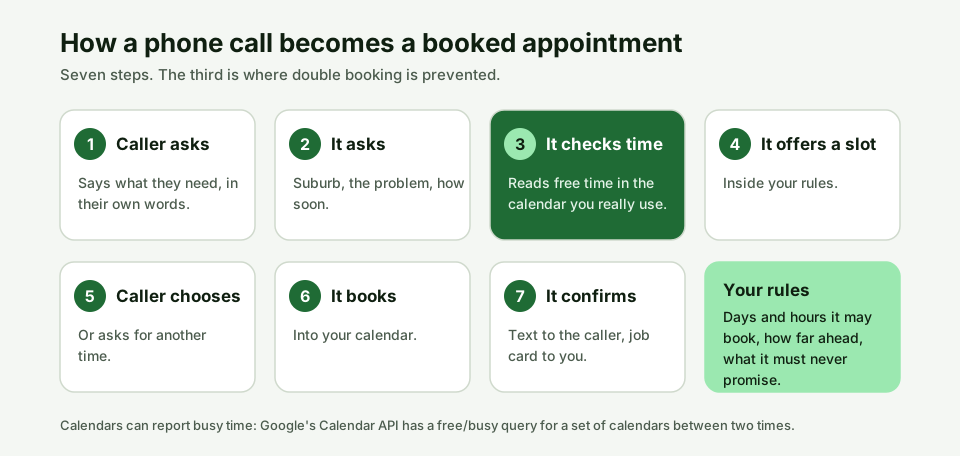
- The caller says what they need. For example, a kitchen power point that has stopped working.
- It asks your questions. Suburb, what is wrong, whether anyone is at risk, how soon.
- It checks free time. It looks at the calendar for open slots inside your rules.
- It offers a time. "I can book an electrician for tomorrow morning. Does 8:30 suit?"
- The caller chooses. If neither time works, it offers another or takes a message.
- It books. The job goes into the calendar.
- It confirms. A text goes to the caller, and a job card goes to you.
How does an AI receptionist know which times are free?
It reads your calendar. Calendar systems can report which periods are busy: Google's Calendar API, for instance, lets an application ask for the busy periods of one or more calendars between a start and an end time, and the free time is what is left. Vistic AI books into Google Calendar today. The practical point for you is which calendar it reads. If your jobs live in one calendar and the receptionist reads another, it will offer times you do not have.
What stops an AI receptionist double booking you?
Three things: reading the calendar you actually use, keeping your open slots narrow, and testing. Double booking usually comes from a mismatch, such as a personal calendar the receptionist cannot see or a job booked on paper that never reached the diary. We could not verify how any system handles two callers asking for the same slot at the same instant, so treat it as a question for every provider, and ring your own number from two phones to try it.
Which booking rules should you set?
Set the rules before you go live, because the receptionist follows them literally. Our product lets you set the days and hours it may book, how far ahead, and what it must never promise. The table adds a few more worth asking any provider about.
| Rule | What it controls | Example |
|---|---|---|
| Days and hours it may book | When work can land in your diary | Monday to Friday, 7:30 am to 3:30 pm |
| How far ahead | The earliest and latest bookable date | From tomorrow, up to 4 weeks out |
| What it must never promise | The things only you can decide | A fixed price, an arrival minute, a warranty |
| Ask your provider: travel buffer | Gaps between jobs in different suburbs | Whether it can leave room for driving |
| Ask your provider: job length | How long a slot lasts for each job type | A hot water check is not a rewire |
The first three rows describe settings in Vistic AI. The last two are questions to ask, not claims about any product.
How far ahead should an AI receptionist book?
Far enough to fill your week, close enough that you can keep the promise. A tradie booking a week ahead and holding two urgent slots a day is a common pattern, but it depends on your trade. The overnight bookings are the useful part: what arrives while you sleep fills the days ahead, which is the case for another pair of hands, or for passing overflow to a subcontractor.
What should an AI receptionist never promise?
It should never promise what only you can decide: a fixed price before you see the job, an arrival time to the minute, or that a repair is possible. Write these into the rules as a short list. A receptionist that says "the electrician will be there at exactly 8:30 and it will cost $180" has made a commitment you did not.
What does the booking confirmation look like?
The caller gets a text, and you get a job card. The text confirms the day and time and the details they gave. The job card carries who, where, what and when, by text and email, so you can ring back already knowing the job. You can see it in our sample call, where the receptionist books an electrician for 8:30 and sends the card on.
Can customers change or cancel a booking?
That depends on the provider, so ask. On our own demo booking page, built on cal.com, the confirmation email carries a link to reschedule or cancel. For phone bookings, ask any receptionist vendor what a caller does when they need to move a time, and test it.
What if no slot suits the caller?
A sensible set-up takes a message and sends you a job card, so you can ring the customer. Do not leave it to chance. If your diary is full for a week, the receptionist should say so honestly and offer the earliest slot. Your rules decide whether it offers the next opening, a callback or a message.
How do you test appointment booking before you trust it?
Ring it five times with different calls and check the diary after each.
- A routine job. Does the slot land in the right calendar at the right time?
- A slot that is already taken. Does it avoid offering it?
- A caller who wants a time outside your hours. Does it refuse politely and offer another?
- A caller in a suburb you do not service. Does it say so, and what does it put on the card?
- A caller who asks for a person. Does it offer to ring you or take a message? Our handover guide covers this.
Check the job card each time. A wrong suburb or the wrong job type is a fault you want to find now.
How does phone booking work for tradies and other small businesses?
Phone booking for tradies works best when the receptionist treats each job type differently. An AI receptionist that books jobs for tradies asks the questions that decide the slot: a hot water check and a switchboard upgrade need different time. The same AI appointment scheduling for small business works for cleaners, pest controllers and mobile services, because the pattern is the same: ask, check availability, offer, book, confirm. Your availability rules are the part that makes it yours. Keep them simple at first, tighten them after a week of real calls, and read each job card against the diary.
Which calendar and job software does it work with?
Vistic AI books into Google Calendar today and sends every call as a job card by text and email. You do not need to change your job software. If you use ServiceM8, Tradify or Simpro, the details are on the job card, and the integrations page lists what connects and what is on request. If your diary lives somewhere else, ask what it connects to before you commit.
What does an AI receptionist with booking cost?
Answer Solo is $149 a month for about 40 calls, and it includes booking into your calendar, a job card by text and email and missed call text back. Answer Crew is $299 for about 100 calls and adds emergency calls that ring your mobile and a transfer to a person on request. All prices are ex GST and month to month, and are placeholders until final pricing is set. The pricing page is the current source.
Quick answers to common questions
Can an AI receptionist book appointments into Google Calendar?
Vistic AI books into Google Calendar today, inside the days, hours and lead time you set.
Can an AI receptionist book jobs after hours?
Yes, into the slots you have opened. See our guide to the AI after hours answering service.
Will it double book me?
It should not if it reads the calendar you really use. Test it before you rely on it, because we could not verify how any system handles two simultaneous callers.
Does the customer get a confirmation?
Yes. A text goes to the caller and a job card goes to you.
Can I control which times it offers?
Yes. You set the days, the hours and how far ahead.
What happens if I have no free slots?
It should take a message and send a job card so you can ring the customer. Check this in your test calls.
Do I need booking software as well?
Not for booking by phone. If customers want to pick a time themselves online, see the website receptionist article.
Sources
- Google for Developers, Calendar API: Freebusy query, read 22 November 2026.
- Vistic AI product pages: AI receptionist, how it works, integrations. First-party descriptions.
Updated 22 November 2026. Corrections log: none yet. Vistic AI sells an AI receptionist, so we have a commercial interest in this topic. The seven-step flow and the rules table are illustrations of a workflow, not recordings or customer data.